
If you’re an IT professional managing Power Platform, you’ve got a lot to track. Microsoft ships updates monthly, and the announcements can feel dense. Tiffany Treacy, Vice President of Product for Power Platform at Microsoft, published the February 2026 feature update on the Microsoft Power Platform Blog. I’ve pulled out what matters most and translated it into plain language and what it means for your day-to-day work and career.
The official Microsoft Power Platform Blog post covers five main areas. Here’s the short version.
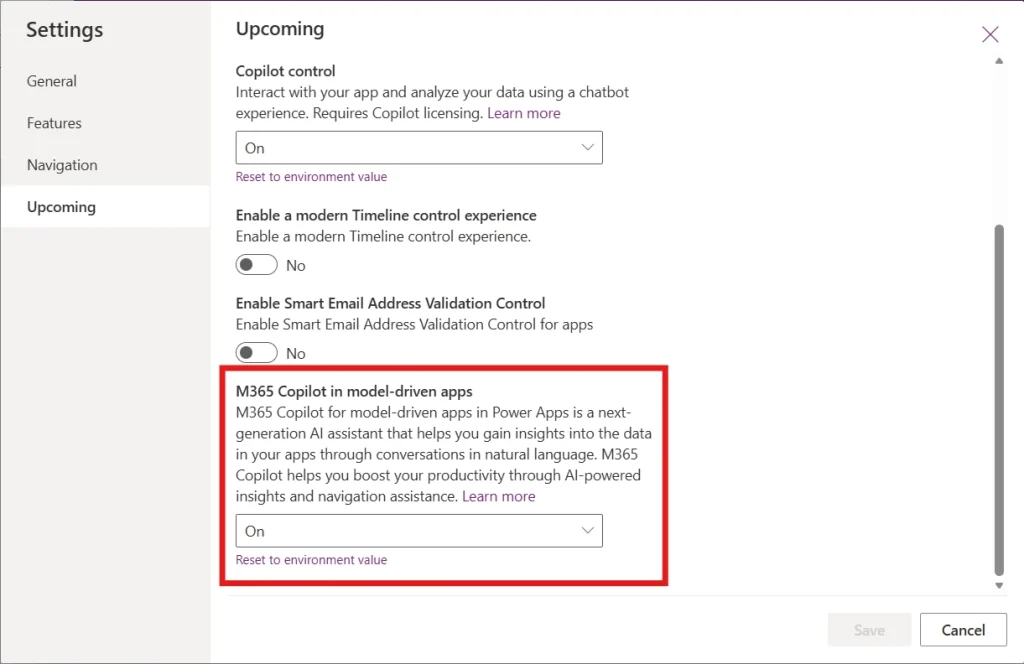
M365 Copilot chat in model-driven apps (public preview). Copilot chat is now available inside model-driven apps. Users can ask questions, analyze in-app data, and use first-party agents (Researcher, Analyst) plus custom Copilot Studio agents, without leaving the app. Administrators configure it per environment; makers turn it on or off per app.
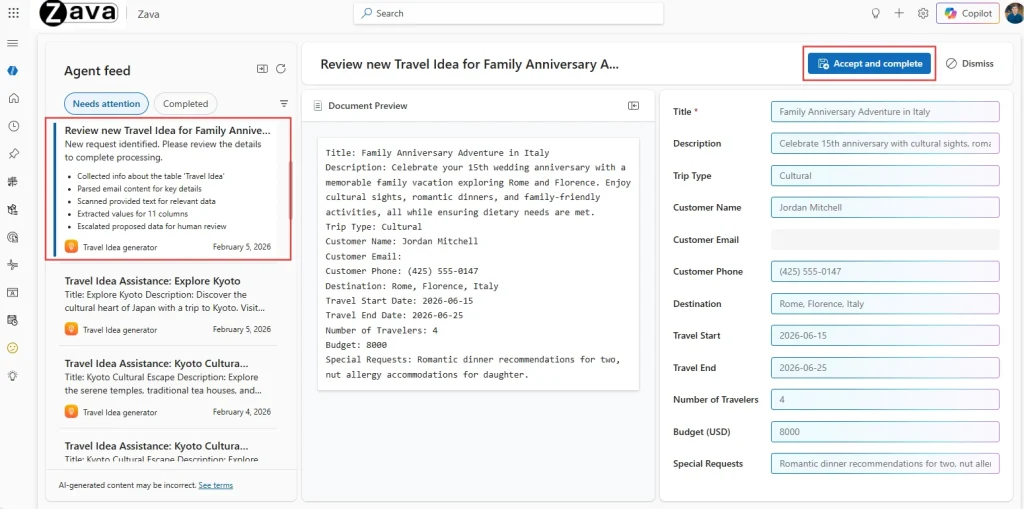
Power Apps MCP and enhanced agent feed (public preview). The Power Apps Model Context Protocol (MCP) Server lets agents act on app data, starting with data entry. Agents can parse unstructured data into app forms, create records, and flag items for human review. The enhanced agent feed gives makers a shared workspace to oversee agent activity, use side-by-side comparison views for approvals, and link to in-app records.
Building Modern Apps
Modern Card control (public preview). A new Card control for canvas apps lets you build responsive layouts with a single control instead of assembling multiple classic controls. It adapts to vertical or horizontal layouts and aligns with Fluent UI.
Theme copy-paste (generally available). You can copy a canvas app’s theme—colors, typography, styling tokens—as YAML and paste it into other apps. Useful for consistent branding across an app portfolio.
Confirm() function as Fluent dialog (generally available). The Confirm function now shows a Fluent-style modal confirmation dialog in canvas apps instead of a browser-native dialog, when modern controls are enabled.
Move canvas apps and SharePoint forms out of the default environment (public preview). Admins can migrate canvas apps and custom SharePoint forms from the default environment to managed environments. Migration can be done manually from Power Platform Advisor recommendations or automated via the Power Platform for Admin v2 connector. Admins choose whether to keep, quarantine, or delete the original resource.
Code apps in Power Apps (generally available). Developers can build web apps with React, Vue, or other frameworks in a code-first IDE and deploy them to Power Platform. Code apps are governed as standard Power Platform assets—IT gets visibility and control without blocking developers.
Copilot where work happens. Instead of switching to a separate Copilot window, users get AI and agents inside the apps they already use. Fewer context switches, more in-flow assistance.
Agents that do work, not just chat. With MCP, agents can create and update records, parse data, and route items to humans. The agent feed gives visibility and approval workflows so you’re not blindly trusting automation.
Default environment cleanup. The default environment tends to become a dumping ground. This preview lets you move apps and SharePoint forms into managed environments so you can apply governance, DLP, and clear ownership.
Code-first apps within Power Platform. Developers who prefer React or Vue can stay in their workflow and still deploy to Power Platform. IT gets the same admin, security, and lifecycle controls as for low-code apps.
Consistency and reuse. Theme copy-paste and the modern Card control make it easier to keep branding and layouts consistent as your app portfolio grows.
Different roles see different wins. The February 2026 update connects to what you care about in the following ways.
If you’re an Admin Lead or Governance owner: You’ve been fighting default-environment sprawl: apps and flows piling up without clear ownership, DLP hard to enforce, and “who built this?” questions that go nowhere. The migration preview gives you an actual path: move canvas apps and SharePoint forms into managed environments, apply governance where it matters, and tell a clearer story to leadership about security and compliance. Copilot in apps and the agent feed give you configuration knobs (per environment, per app) instead of all-or-nothing. Code apps GA means developers who build with React or Vue no longer live outside your visibility. They’re Power Platform assets you can monitor and govern like everything else. You get more control without becoming the bottleneck.
If you’re a Delivery Lead: You’re juggling demand vs. capacity, governance constraints that slow projects, and pressure to prove ROI. Theme copy-paste and the Card control cut repetitive setup and layout work, so you get faster builds and consistent design. The default-environment migration reduces the “why is this app in Default?” conversations so you can focus on delivery. Copilot and agents inside model-driven apps mean users get help where they work, which can improve adoption and reduce support load. Code apps GA lets you bring pro developers into the Power Platform fold without a separate toolchain. One platform, one governance model. You can deliver more without multiplying complexity.
If you’re on an Enterprise or Transformation team: You need risk-managed innovation: quick wins that don’t compromise security or compliance. The February 2026 features support that: default-environment migration improves governance posture, Copilot and agents add human-in-the-loop and visibility, code apps bring code-first builds under the same enterprise guardrails. Theme copy-paste and modern controls help you scale design consistency across an app portfolio. You get incremental value and a clearer path from pilot to scale.
If you’re a citizen developer or Power Platform specialist: You’re building skills while balancing governance and maintenance. Theme copy-paste and the Card control make it easier to build professional-looking apps without fighting layout complexity. Copilot in model-driven apps puts AI assistance where you work. The agent feed and MCP give you visibility into what agents do and a way to approve before data changes. These updates add to your toolkit without forcing you to learn everything at once. They also signal where the platform is going (AI, agents, human oversight), which helps you plan your next skills.
If you’re an AI-curious Executive: You want practical value, not hype. The February 2026 update emphasizes governance and human oversight. Copilot in apps is configurable per environment and app; the agent feed requires human review before agents create or update records. Default-environment migration reduces risk and improves audit readiness. Code apps GA brings more development capacity under one governed platform. You get incremental, low-risk ways to adopt AI and automation without betting the company.
If you’re a Developer or Tech Professional: Code apps GA matters most. You can build with React, Vue, or other frameworks in your preferred IDE and deploy to Power Platform. No need to choose between “low-code” and “real code.” You get code-first flexibility with the same visibility and controls IT expects. The MCP server and agent feed show how agents will interact with apps and data, which is useful if you’re integrating AI into solutions. Theme copy-paste and modern controls give citizen developers better patterns, which can reduce the quality and maintainability issues you sometimes inherit. Your Power Platform skills (governance, ALM, environments) apply whether the app is canvas, model-driven, or code. That’s career-relevant.
Less default-environment chaos. If you’ve struggled with apps scattered in the default environment and no clear boundaries, the new migration preview gives you a path out. You can move apps to managed environments and enforce DLP, security groups, and lifecycle policies where they matter.
One place for Copilot configuration. Microsoft 365 Copilot chat in model-driven apps is configured in Power Platform admin center. You set it up per environment; makers enable or disable it per app. That gives you governance without blocking every use case.
Agents with a human checkpoint. The Power Apps MCP and agent feed add approval and visibility. You can see what agents are doing and require human review before records are created or updated. That’s helpful for risk-sensitive processes and compliance.
Code apps under the same roof. Code apps are governed like any other Power Platform asset. You get visibility in the admin center, standard deployment and environment controls, and no need for a parallel governance model for “real” code.
Faster, more consistent app delivery. Theme copy-paste and the Card control reduce repetitive setup and layout work. That shortens build time and helps you maintain design standards across teams.
Governance and compliance. The default-environment migration and code apps GA position you to own Power Platform governance at scale. Being able to say you’ve moved apps out of Default, applied DLP in managed environments, and governed both low-code and code apps is a strong differentiator.
AI and agents. Copilot in apps and MCP/agent feed are where the platform is going. Understanding how to configure, secure, and govern these capabilities keeps you relevant as AI becomes part of every workflow.
Modern development practices. Code apps GA means you’ll be working with developers who use React, Vue, and DevOps tooling. Familiarity with how Power Platform fits into that pipeline (ALM, pipelines, environments) strengthens your role as a bridge between IT and engineering.
Reducing technical debt. Default-environment sprawl is technical debt. The migration preview gives you a concrete way to address it and tell a clear story to leadership about governance, security, and compliance.
The February 2026 Power Platform update gives IT professionals better tools for governance (default-environment migration), AI (Copilot in apps, MCP, agent feed), and hybrid delivery (code apps GA). It’s not just feature noise. It’s directly relevant to reducing sprawl, governing AI safely, and supporting both low-code and code-first teams under one platform.
If you want the authoritative source, the Microsoft Power Platform Blog and Microsoft Learn are the places to go. This recap is meant to save you time and connect the announcements to what matters for your role.