

Picture this: A flow in your tenant uses a Microsoft Entra–based connector to pull data from an external partner’s tenant. No one intended to move internal data out. But the same connector can be used in the opposite direction. With tenant isolation Off—Power Platform’s default—cross-tenant connections are allowed seamlessly for any user with valid Entra credentials. One misconfigured app or over-permissioned account, and you have cross-tenant data movement you didn’t plan for.
Microsoft puts it plainly in their cross-tenant restrictions documentation: “Tenant isolation makes it easy for administrators to ensure that these connectors can be harnessed in a safe and secure way within the tenant while minimizing the risk of data exfiltration outside the tenant.”
That’s what tenant security is. It’s not abstract. It’s who can build and publish, where data can flow, what crosses tenant boundaries, and how you see what’s happening.
If you’re an Admin Lead or Governance lead, you’ve felt this.
Pressure to enable before baseline is ready. Leadership wants Copilot and Power Platform “on.” You’re asked to enable broadly while you’re still figuring out default environment access, connector policies, and who can publish agents.
Blast radius is huge. Copilot doesn’t invent access—it amplifies it. Oversharing and weak data boundaries become visible fast. Copilot Studio follows Power Platform data policies, environment routing, and DLP. If those aren’t set, you’re governing in the dark. Microsoft’s Copilot Studio security and governance doc spells this out.
Too many control points, not one story. You have Power Platform admin center (security, data policies, tenant isolation, environments), Entra (identity, conditional access), Purview (compliance, sensitivity), and Copilot Studio (agent publishing, knowledge sources, channels). Without a simple “baseline” narrative, you either lock everything down—and adoption routes around you—or leave everything open, and incidents become inevitable.
The good news: You can create safe speed with a small set of baseline controls and clear “lanes” for experimentation versus production. Security fails when it’s a surprise. It works when it’s a default.
It’s not one setting. It’s the set of controls that decide four things:
Who can build and publish. Licenses, environment roles, and—for Copilot—who can publish agents and to which channels. As Microsoft’s governance considerations note, access starts with having a license. The type of license determines what assets and data a user can access. Environment and Dataverse roles control access within environments.
Where data can flow. Data policies (DLP) classify connectors—Business Data only versus No Business Data—and control which connectors can be used together in the same app or flow. Microsoft’s data policies overview states that “Data policies in Power Platform admin center allow administrators to control access to these connectors in various ways to help reduce risk in your organization.”
What crosses tenant boundaries. Tenant isolation (cross-tenant inbound/outbound restrictions). With isolation On, cross-tenant connections are blocked unless explicitly allowed. Cross-tenant restrictions specify that “Power Platform tenant isolation only works for connectors using Microsoft Entra ID–based authentication such as Office 365 Outlook or SharePoint.”
How you see what’s happening. Audit logs (Power Platform activity logging, Purview, Sentinel), PPAC analytics, and security score. See Power Platform security and governance for the full picture.
Copilot Studio uses the same Power Platform constructs—environments, data policies, environment routing—plus Copilot-specific controls: maker/user authentication, knowledge sources, actions/connectors/skills, HTTP requests, publication to channels, AppInsights, and triggers. Admins can disable publishing of agents that use generative AI for the tenant, disable data movement outside the US, and govern which agents and plugins show in Microsoft 365 Copilot via the Microsoft 365 admin center.
Data policies affect both design-time and runtime. When an admin limits access to a connector or specific actions, makers can’t save apps or flows that violate policy. At runtime, existing resources that violate policy can be put in a suspended or quarantine state; connections can be disabled. Policy changes cascade; full enforcement can take up to 24 hours depending on tenant size. (Data policies – Process for policy changes)
Purview and Sentinel give you maker audit logs and monitoring plus alerts on agent activity. Configure data policies for Copilot Studio agents and review Copilot Studio configuration settings for the details.
Risk 1: Cross-tenant data movement. With tenant isolation Off, users from your tenant can establish outbound connections to other tenants’ data—and vice versa—with valid Entra credentials. “We didn’t realize this connection crossed tenants” is a common post-incident line.
Risk 2: Oversharing and invisible access paths. Power Apps and Power Automate don’t grant access to data users don’t already have. The issue is over-permissioned accounts and broad sharing. Copilot amplifies whatever permissions exist.
Risk 3: Untracked assets. Apps, flows, and agents are created faster than governance visibility. In the Default environment, all users in a tenant are granted access to the Environment Maker role. Without environment strategy and inventory (e.g., CoE, PPAC), you don’t know what exists or who owns it.
Decision vocabulary for the rest of this post:
Keep it tight. Link to Microsoft docs for implementation details.
In Power Platform admin center: Security → Identity and access → Tenant isolation. Turn Restrict cross-tenant connections On. Add allow-list exceptions only where required. Cross-tenant restrictions
Control which connectors can be used together (Business Data only vs. No Business Data) and block specific connectors where needed. Apply at tenant or environment level. Data policies overview
Entra groups for access. Least privilege. Clear admin roles. Conditional access for Power Platform where appropriate. Conditional access guidance
Use environments to separate development, test, and production. Avoid building everything in Default. Environment routing for Copilot Studio gives makers a safe space to build. Governance considerations – Environments
IP firewall for high-risk environments and data. IP firewall
Know what exists, who owns it, and what changed. Use PPAC analytics, activity logging, Purview audit logs for Copilot Studio makers, and Sentinel for agent activity. Security overview
Six Baseline Controls at a Glance
| Control | What to do / Where to find it |
|---|---|
| 1. Cross-tenant restrictions (tenant isolation) | PPAC → Security → Identity and access → Tenant isolation. Turn Restrict cross-tenant connections On. Add allow-list exceptions only where required. |
| 2. Data policies (DLP) | Control connector groupings (Business Data only vs. No Business Data); block connectors as needed. Apply at tenant or environment level in PPAC. |
| 3. Identity and access hygiene | Entra groups for access. Least privilege. Clear admin roles. Conditional access for Power Platform where appropriate. |
| 4. Environment strategy (safe lanes) | Separate dev, test, and production. Avoid building everything in Default. Use Copilot Studio environment routing for makers. |
| 5. Network controls | IP firewall for high-risk environments and data. Configure per environment in PPAC. |
| 6. Visibility and audit | PPAC analytics, activity logging, Purview audit logs (Copilot Studio makers), Sentinel (agent activity). Security overview for score and recommendations. |
Example 1 (Pass): Internal Copilot Studio agent that searches only approved, labeled SharePoint knowledge sources. Runs in a dedicated environment with a data policy applied and audit enabled. No cross-tenant connectors. Least-privilege access. Enable broadly.
Example 2 (Pause): Agent or flow that can send internal data to external services via broad connectors—e.g., unconstrained HTTP or consumer connectors mixed with business data. Pause until DLP, cross-tenant restrictions, and least-privilege are in place.
Mini-case (anonymized): Adoption was accelerating. Assets lived in Default and Teams. Connector use drifted. Leadership wanted Copilot enabled quickly. They allowed experimentation in a defined lane while building a tenant security baseline. Controls implemented: DLP baseline, environment strategy, visibility (inventory/CoE or PPAC), and a clearer role/access model. Then they turned tenant isolation On with an explicit allow-list only where needed. Outcome: They could say “yes” faster because the safe path was clear—and leadership had a defensible security story.
Safe lanes: Experiment lane—limited audience, low-risk data, explicit boundaries. Production lane—strict controls and monitoring.
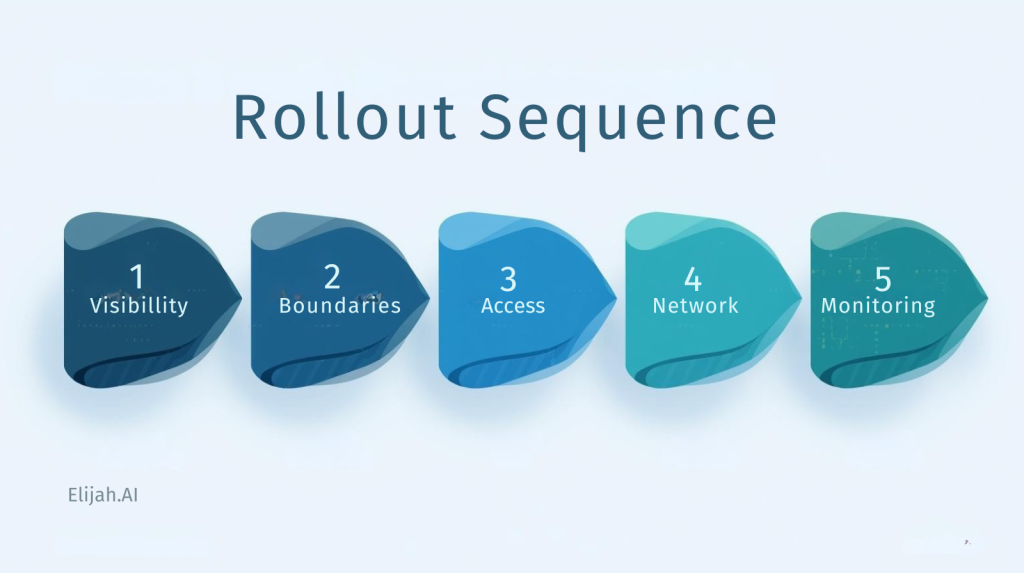
Order of implementation: Visibility first (who has what, where). Then data boundaries (DLP, tenant isolation). Then access tightening (roles, conditional access). Then network controls where required. Then continuous monitoring (audit, security score, recommendations). Microsoft’s Security overview surfaces recommendations you can act on.
Downloadable artifact: A Tenant Security Baseline (Copilot + Power Platform) checklist—10–15 items max, mapped to Pass/Pause/Stop decisions. Link to Microsoft docs for each item.
One-page security baseline: The same six controls in simple language. What we have on. What we allow. What we block. “We use tenant isolation, DLP, environment strategy, and audit so we can enable Copilot and Power Platform safely.”
Security score (Microsoft): PPAC Security → Overview shows a security score (Low/Medium/High) and recommendations. Use it: “We’ve acted on these recommendations; here’s our score and what we’re doing next.”
Next step for leadership: “We’ve defined our lanes and applied a baseline DLP and cross-tenant restriction posture this month. Here’s the one-page summary.”
You don’t need perfect security. You need a baseline that prevents predictable failures: cross-tenant leakage, unbounded connector use, and invisible assets.
Your next step: Define your lanes and apply a baseline DLP and cross-tenant restriction posture this month. Use Microsoft’s Security overview and governance docs as the single source of truth.
Copilot amplifies your permissions. Fix the permissions first.