
Let me introduce you to Microsoft Power Platform. It’s a suite of tools that helps businesses build applications, automate workflows, and analyze data. But that description doesn’t really capture what it can do for you.
I’ve seen organizations transform how they work using Power Platform. They move faster. They solve problems that used to feel impossible. They give their teams tools that actually fit how they work.
Let me break down what Power Platform is, why it matters, and how it can transform your business.
Microsoft Power Platform is a collection of applications that work together to help businesses analyze data, automate processes, and create custom apps. Think of it as a toolkit where each tool does something specific, but they’re designed to work together.
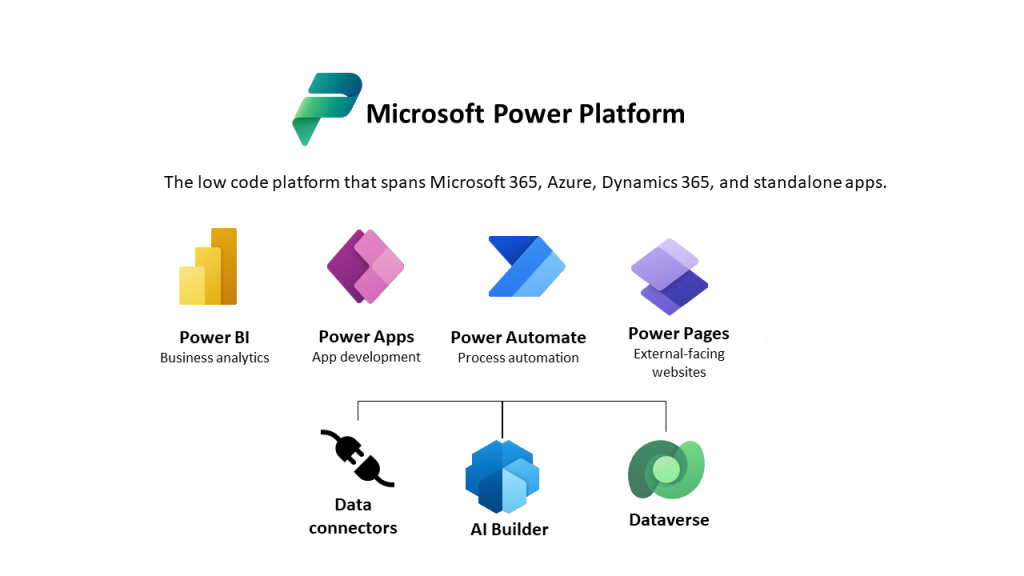
The platform consists of four main components:
Power BI is a tool for data visualization and business intelligence. It takes your data and turns it into charts, graphs, and dashboards that actually make sense. Instead of staring at spreadsheets, you see what your data is telling you.
Power Apps is a platform for building custom applications without extensive coding. You can create apps tailored to your specific business needs. Field workers can report issues from their phones. Managers can approve expenses on the go. You build exactly what you need.
Power Automate is a service for automating workflows across various applications and services. It’s like having a really smart assistant who can work across all your different systems, handling tasks automatically. When something happens in one system, Power Automate can trigger actions in another.
Power Virtual Agents is a tool for creating chatbots to engage with customers and employees. You can build conversational AI agents without being an AI expert. They handle common questions, route complex issues to humans, and work around the clock
Here’s what makes Power Platform valuable for organizations:
It integrates with Microsoft’s ecosystem. Power Platform seamlessly connects with other Microsoft services like Azure (Microsoft’s cloud platform), Dynamics 365 (Microsoft’s business applications), and Office 365. Your data flows between systems naturally. You’re not building isolated solutions.
It’s user-friendly. The platform is designed for both technical and non-technical users. You don’t need a computer science degree to build something useful. If you can use Excel or PowerPoint, you can probably build a Power App or automate a workflow.
It scales. Power Platform works for businesses of all sizes, from startups to large enterprises. You can start small with a simple app or automation and grow from there. As your needs evolve, the platform evolves with you.
It saves money. You reduce development and operational costs with low-code solutions and automation. Instead of spending months and tens of thousands of dollars on custom development, you can build something in weeks for a fraction of the cost.
It moves fast. You can quickly implement solutions to respond to changing business needs. When a new requirement comes up, you can build a solution quickly rather than waiting months for traditional development.
When organizations adopt Power Platform, they typically see three big changes:
Productivity increases. Automating repetitive tasks and streamlining operations frees up time. People can focus on work that requires human judgment instead of data entry or form processing. Teams get more done with the same resources.
Decision-making improves. With better data visualization and analysis, organizations can make informed business decisions. When data is easier to access and understand, insights become clearer. You’re not guessing. You’re using data.
Innovation accelerates. When it’s easier to build custom applications and automate processes, people start solving problems they might have ignored before. They build tools that fit their specific needs, not generic software that sort of works.
Power Platform includes some powerful features that make it even more useful:
AI Builder integrates artificial intelligence into your apps and business processes. You can add things like document processing, object detection, or prediction models without being an AI expert. It’s like having AI features you can plug into your solutions.
Connectors give you access to a variety of data sources. Power Platform connects to hundreds of services, from Salesforce to Google Analytics to custom APIs. Your data doesn’t have to live in one place. You can pull it all together.
Power Fx is the low-code programming language that Power Apps uses. It’s designed to be readable and learnable. If you’ve used Excel formulas, Power Fx will feel familiar. It’s strongly typed, which means it helps catch errors before they become problems.
Dataverse is Microsoft’s data service for building enterprise-grade solutions. Think of it as a secure, scalable database that’s built into Power Platform. Your data lives there, and your apps can access it. It handles things like security, relationships between data, and business logic automatically.
Copilot Studio (formerly Power Virtual Agents) lets you build AI-driven agents to automate tasks and enhance productivity. You can create conversational AI that understands context and handles complex interactions.
Here’s the thing about Power Platform: The individual tools are powerful, but they’re even more powerful when you use them together.
You might use Power BI to visualize data from your business processes. Then use Power Automate to automate those processes based on what the data tells you. Build a Power App to give your team an interface for interacting with the automated workflows. And create a Power Virtual Agent chatbot to help users get answers quickly.
It’s an integrated system. Data flows between components. Solutions build on each other. You’re not managing separate tools. You’re building a cohesive platform.
Power Platform includes built-in security and governance features:
Power Platform Admin Center gives you centralized control to manage environments, users, and security settings. You can see what apps exist, who’s using them, and how they’re performing. It’s your command center for Power Platform.
Governance best practices help you establish frameworks to ensure compliance and security. You can set up policies for who can create apps, what data they can access, and how solutions move through development to production.
Managed Environments provide tiered governance and administrative controls. You can monitor, secure, and manage Power Platform resources at scale. It ensures everything meets your organizational policies.
Application Lifecycle Management (ALM) is a fancy way of saying you have a structured process for moving solutions from development to testing to production. Power Platform includes tools to help with this:
ALM Accelerator provides pre-configured pipelines for continuous integration and continuous delivery (CI/CD). That’s a fancy way of saying it automates moving your solutions through different environments. You build it once, and the system handles moving it through development, testing, and production automatically.
Power Platform CLI is a command-line interface for scripting and automating development tasks. If you’re comfortable with scripting, this lets you handle tasks like packaging solutions and managing environments programmatically.
If you’re thinking about using Power Platform, here’s what I’d suggest:
Start with a specific problem. Don’t try to build everything at once. Pick one process or one use case that’s causing pain. Maybe it’s automating a manual approval process. Or building an app for field workers. Or creating a dashboard to track key metrics. Build that first.
Learn the basics. Microsoft provides extensive documentation and training resources. You don’t need to become an expert overnight, but understanding the fundamentals will help you build better solutions.
Think about your data. Where does your data live? How does it connect? Power Platform works best when your data is organized and accessible. You might need to clean up your data sources before connecting them.
Consider governance. Even if you’re starting small, think about how solutions will be managed as you scale. Who approves new apps? How do you ensure security? What happens when someone leaves?
Use the connectors. Power Platform connects to hundreds of services. Don’t try to build everything from scratch. Use the connectors that already exist. They’ll save you time and ensure compatibility.
Microsoft Power Platform is a powerful suite of tools that makes custom app development, workflow automation, and data analysis accessible to more people. It’s not about replacing professional developers. It’s about empowering more people to solve problems with technology.
When organizations embrace Power Platform, they see productivity gains, better decision-making, and accelerated innovation. But the real value comes from solving real problems with tools that fit how people actually work.
The platform integrates seamlessly with Microsoft’s ecosystem. It’s user-friendly for both technical and non-technical users. It scales from small startups to large enterprises. And it includes powerful features like AI Builder, connectors, and governance tools.
The question isn’t whether Power Platform is powerful enough. It is. The question is: What problem do you want to solve first?
Start there. Build one solution that solves that problem. Then build another. Before you know it, you’ll have transformed how your organization works.